41 doors.
7 hardware sets.
One architectural set.
One bid deadline.
Here is what happened when FastBid24 entered the workflow.
The project
A daycare center bid package: architectural drawings and a Division 8 specification, exactly as issued. The door schedule existed only as a rendered image on sheet A111-B — no text layer, no export, no shortcuts.
The old workflow
- 01Locate the door schedule across the architectural set
- 02Retype every row — marks, sizes, materials, ratings — into a spreadsheet
- 03Read the hardware sets out of the spec, item by item
- 04Map each opening to its set by hand, flipping between documents
- 05Hope nothing was missed when the number gets signed
The moment FastBid24 entered
What FastBid24 saw
Extracted
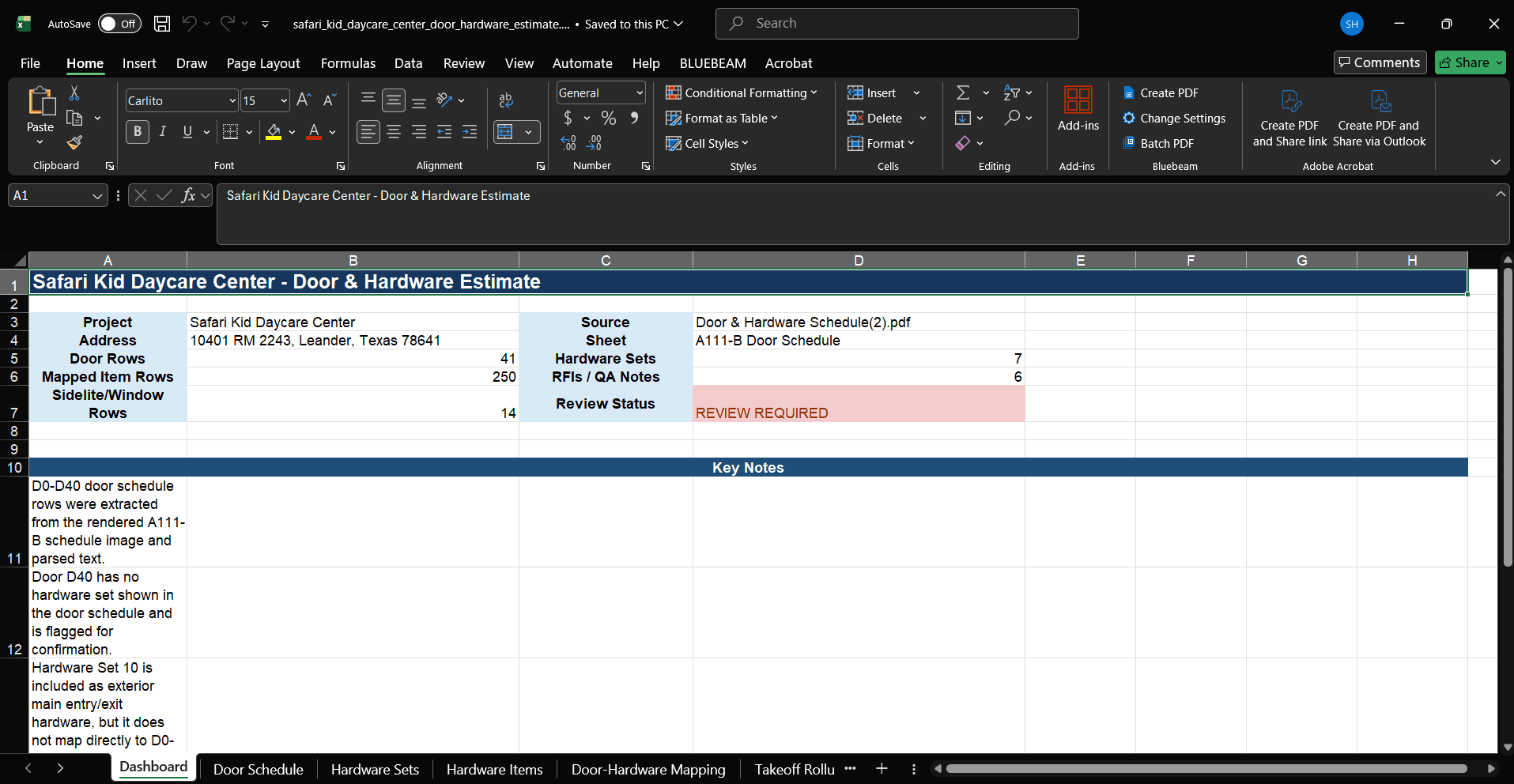
41 door rows from the rendered A111-B schedule — read as image and parsed text, reconciled against each other
Structured
7 hardware sets, item by item, from the specification
Connected
250 hardware items mapped to their openings
Separated
14 sidelite and window rows structured apart, so glazing scope isn't priced as doors
Flagged
6 RFI-ready questions where the documents disagreed or went silent
The moment worth remembering
A hardware set with no door
Hardware Set 10 exists in the specification as exterior main entry/exit hardware — and maps to no scheduled opening. Its mirror image was there too: Door D40, scheduled with no hardware set at all. Both surfaced as flagged review items with the evidence attached, not as silent guesses inside a quantity.
Verified results
Same day
turnaround, estimator QC included
6
RFIs drafted before bid day
2
silent document gaps caught (D40, Set 10)
0
quantities guessed — flags instead
The deliverable it became — the real workbook, QA notes included:
This workflow runs in Doors & Hardware AI →
What would FastBid24 find in your project?
Send a real package and get the same forensic treatment — evidence, flags, and an estimator-reviewed deliverable.